Every business owner and project manager faces the same dilemma when starting a new web project: Do you build on a user-friendly CMS like WordPress, or invest in a robust framework like Laravel?
Both technologies dominate the web development landscape, but they serve vastly different purposes. Choosing the right foundation determines not only your launch date but also your long-term scalability, maintenance costs, and ability to innovate.
In this Laravel vs WordPress guide, we’ll cut through the noise. We’ll compare performance, security, cost, and use cases so you can make a data-driven decision for your 2026 project.
What is WordPress?
WordPress is a Content Management System (CMS). Originally a blogging platform, it now powers over 40% of the web. It features a visual admin dashboard, a massive plugin repository, and thousands of themes. It is designed to get a website up and running with minimal technical expertise. Use WordPress for blogs, corporate sites, and quick launches with a limited budget
What is Laravel?
Laravel is a PHP web framework. Think of it as a toolkit of pre-built code that developers use to build custom applications from scratch. It provides the structure for complex logic, custom databases, and unique functionality that a standard CMS cannot handle. It requires professional development knowledge but offers limitless flexibility.
The Core Showdown: Understanding the Fundamental Difference
Before we dive into a side-by-side Laravel WordPress comparison, we need to understand what these tools are. The confusion starts here, and so does the clarity.
- WordPress is a Content Management System (CMS): Think of WordPress as a prefabricated house. It comes with a complete structure, pre-built rooms, and a system for decorating. You can move furniture around, paint the walls, and even add a new room, but you can’t easily change the foundation or the load-bearing walls. It’s designed for one primary purpose: to manage and publish content efficiently.
- Laravel is a Web Application Framework: Laravel is not a house; it’s the architectural blueprint, a high-end toolset, and a pile of the best quality materials. It gives you everything you need to build a custom skyscraper, a cozy cabin, or anything in between. It provides the structure (MVC architecture), security features, and tools (like an ORM for database management) to build a powerful, tailor-made application from scratch. It’s designed for ultimate flexibility and performance.
This WordPress vs Laravel distinction is the root of all other differences. A CMS is a finished product you configure; a framework is a starting point you build upon.
Side-by-Side Comparison: Laravel vs WordPress
The difference between Laravel and WordPress lies in framework vs CMS architecture. To help you visualize the Laravel WordPress comparison, here is a breakdown of how they perform across critical business metrics.
| Feature | WordPress | Laravel |
| Learning Curve | Very Low. Designed for non-developers. | High. Requires professional PHP knowledge. |
| Development Time | Days to weeks. | Weeks to months. |
| Performance | Moderate to Slow (requires caching plugins). | Excellent (highly optimized code). |
| Scalability | Limited. Can break under high traffic without enterprise hosting. | Built for scale. Handles millions of users easily. |
| Security | High Risk. Relies heavily on third-party plugins. | High Security. Code is custom and audited. |
| Customization | Limited to what plugins/themes allow. | Unlimited. Code exactly what you need. |
| Cost | Low initial cost; moderate ongoing costs. | High initial investment; lower maintenance scaling. |
| SEO Capabilities | Excellent out-of-the-box with plugins like Yoast. | Developer-driven; requires custom setup. |
| Best For | Blogs, Brochure sites, Small business sites. | SaaS, E-commerce, Custom Web Apps, Enterprises. |
Performance Comparison: Laravel vs WordPress
Performance is often the first consideration when choosing between WordPress and Laravel.
WordPress Limitations:
- Sites with 20+ plugins often experience slow page loads.
- Poorly coded themes or outdated plugins can cause database bottlenecks.
- Shared hosting environments reduce responsiveness under high traffic.
- Caching plugins are almost always required to improve speed.
Laravel Advantages:
- Optimized MVC architecture ensures clean, efficient code execution.
Built-in caching systems like Redis or Memcached enhance speed. - Queue processing prevents long-running tasks from blocking users.
- Custom database indexing and query optimization improve performance under heavy loads.
Best For:
- High-traffic platforms
- SaaS applications
- API-heavy systems
- Real-time dashboards
Verdict: Laravel offers long-term performance stability for complex applications.
Scalability Analysis: Laravel vs WordPress for Growing Businesses
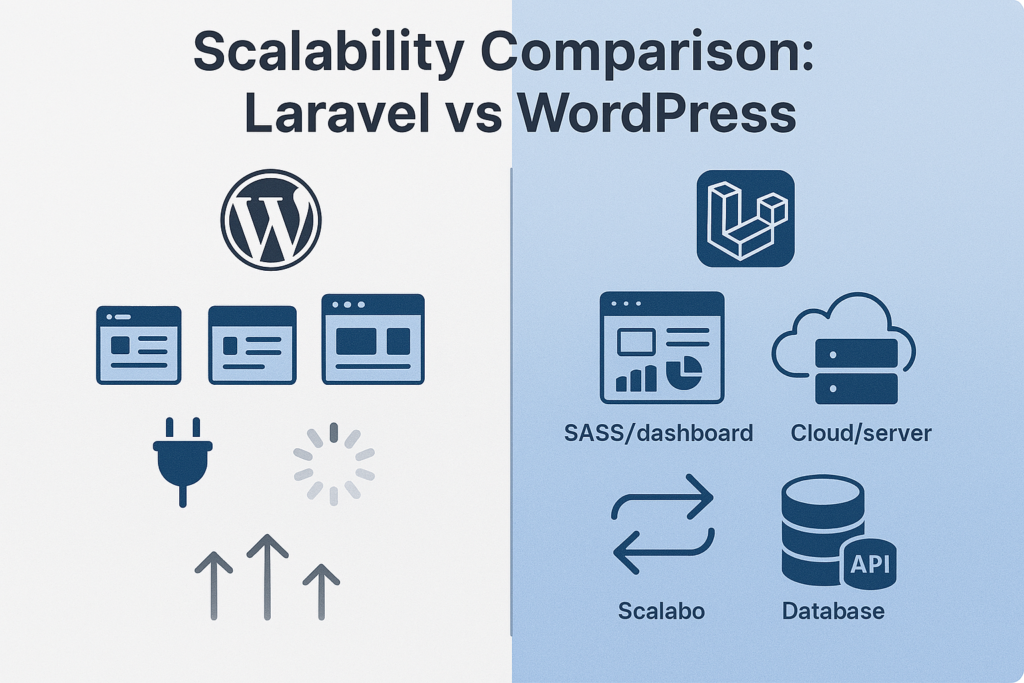
Scalability is the key factor when choosing between Laravel and WordPress for expanding businesses. Both are great starters, but their designs shape what happens as you grow. WordPress is a content-focused system, perfect for simple sites, but it can hit walls under stress. Laravel is a full PHP toolkit, built for change, handling complex setups without losing steam. Let’s break it down with everyday examples.
WordPress’s Scalability Limits: When Ease Turns Tough
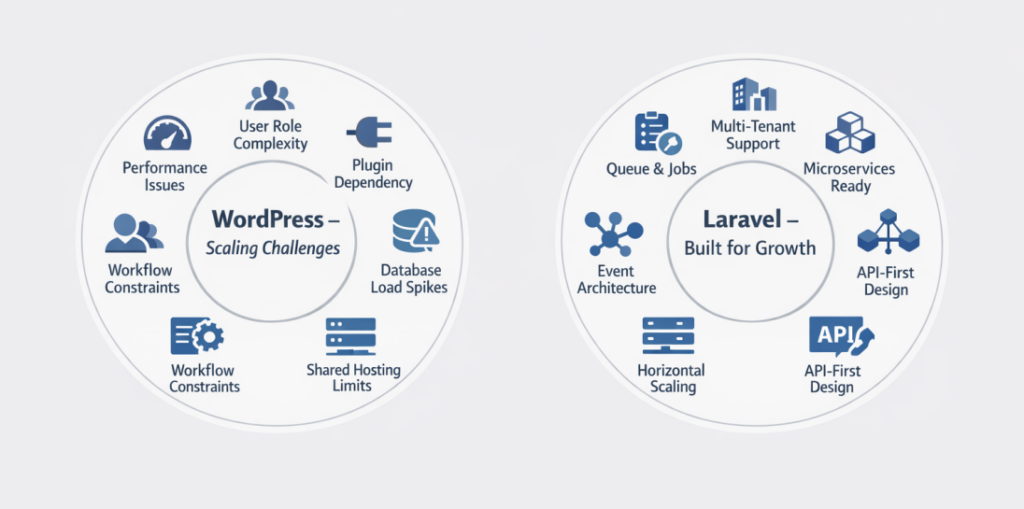
WordPress runs over 43% of websites worldwide, so it’s great for quick launches, but its single-block design stops scaling past medium-sized growth. As companies grow, these issues pop up:
Complex User Roles and Permissions
Setting up detailed access stresses WordPress’s built-in tools. Add-ons like MemberPress help, but they add weight, slowing admin panels and mixing up rights across sites. For example, company networks with hundreds of users often log in slower than 5 seconds.
Heavy Database Queries from Plugins and Content
With 20+ add-ons, database requests explode, WooCommerce plus SEO tools spike MySQL by 300%, timing out during busy times. Huge amounts of data make searches lag on cheap hosts, pushing page speeds to 4+ seconds. Research links 60% of WordPress slowness at scale to too many plugins.
Beyond Plugin Workflows
Custom automations stretch free or paid plugins thin. Basics work, but fancy ones like Automator or Ninja Forms crack under odd situations, leaving fragile tweaks that fail updates.
Traffic Surges on Shared Hosting
Quick crowds flood shared plans, burning CPU/RAM and crashing sites. Even smart hosts like WP Engine manage visitors daily before upgrades, but adding power vertically costs more than spreading out horizontally.
These hurdles mean WordPress fits small-to-medium firms, but risks moves to custom builds for fast growth.
Laravel’s Scalability Perks: Built for Big Dreams
Laravel beats WordPress limits with a flexible, event-based setup, making it smooth for SaaS, shopping, and busy apps. Its toolbox, like database helpers, waiting lines, and APIs, keeps things steady:
Multi-Tenant SaaS Setup
Laravel nails splitting data among clients. Tools like Stancl/Tenancy switch databases per client automatically, keeping secrets safe without rewriting code. Real example: Orthicon uses Laravel for Emmy Awards, dodging 570% traffic jumps with tenant paths.
Background Queue Systems for Tough Jobs
Send tough tasks to queues like Redis/SQS, avoiding frozen screens. Laravel Horizon watches workers, growing sideways to handle millions of night jobs, great for imports or stats.
Microservices for Clean Design
Split apps into pieces using Laravel Sail/Docker. Each part scales alone a pay hub on strong servers, content on light ones. Ideal for finance or health sectors needing strict zones
API Connections for Mobile/Outside Stuff
Native Sanctum/JWT keys make REST/GraphQL APIs slick, hooking to AWS/Azure or old systems. Laravel Forge sets up deploys, backing mixed clouds for easy grows.
Real-Time Apps with Busy Traffic
Notifications, live views, or chatters via Laravel. Events spread globally, beating WordPress’s older poll-style tricks.
In 2026, Laravel’s Vapor serverless cuts costs 70% while raising speed, prepping for AI apps.
Cost Comparison: Laravel vs WordPress
| Cost Category | WordPress (Typical Business Website) | Laravel (Custom Web App) |
| Initial Setup / Development | $3,000 – $15,000 | $25,000 – $80,000+ |
| Themes / Plugins / Licenses | $200 – $800 yearly | Varies |
| Hosting | $10 – $100 / month | $50 – $500+ / month |
| Maintenance & Support | $1,000 – $5,000 yearly | 15–20% of the development cost annually |
When to Choose WordPress
WordPress powers over 40% of the web, and for good reason. It excels in scenarios where speed of deployment, ease of use, and a vast ecosystem are the primary drivers.
- Blog or Content Website: This is WordPress’s origin story. Its core functionality is built around a powerful publishing workflow. Features like categories, tags, authors, and revision history are native and intuitive. For content-first sites, the Gutenberg block editor provides a flexible, Medium-like writing experience that non-technical users can master quickly.
- Corporate Website: For most small to medium-sized businesses, a website is a digital brochure. They need a site that looks professional, is easy to update, and can be launched in days, not months. WordPress, with a premium theme and a few plugins, is the perfect solution.
- Fast Launch: A basic WordPress site can be installed and themed in a matter of hours. There are thousands of pre-built templates and themes available that can be customized to match a brand’s identity without writing a single line of code. This rapid prototyping and deployment capability is unmatched.
- Limited Budget: The core software is free. Development costs are generally lower because you’re hiring an integrator rather than a senior developer building everything from scratch. Hosting is also cheap and widely available. A functional, attractive site can be built for a fraction of the cost of a custom application.
- Simple WooCommerce Store: If you need to sell a handful of physical or digital products, WooCommerce is a fantastic plugin. It handles inventory, carts, checkout, and payments seamlessly. It’s ideal for artisan shops, small boutiques, or businesses adding an e-commerce arm to their existing site. However, for complex inventory management, subscription models, or multi-vendor marketplaces, it can become unwieldy.
WordPress is ideal for marketing-focused websites because it puts control in the hands of the marketing team. They can run A/B tests, manage SEO, and launch new landing pages without waiting for a developer. Its built-in blogging capabilities also make it the best platform for content marketing strategies.
When to Choose Laravel
Laravel is a PHP framework designed for developers to build robust, secure, and scalable applications. You choose it when the functionality of the site is more important than the content management.
- Custom Web Application: When your project is less about pages and more about processes, you need a custom application. Think of a tool for managing client projects, a custom booking system with complex rules, or a social network for a niche community. Laravel provides the structure to build these unique, feature-rich applications from the ground up.
- SaaS Platform: Software as a Service platforms have complex requirements: user authentication, subscription billing, multi-tenancy, and robust API rate limiting. Laravel has built-in features and packages that provide a solid foundation for these models.
- Complex Dashboards: If your “website” is actually a data visualization tool, you need a framework that can handle complex queries and present data efficiently. Laravel’s Eloquent ORM allows developers to interact with databases in a clean, expressive way, making it perfect for pulling and aggregating large datasets to be displayed in custom admin panels or analytical dashboards.
- API-Driven Architecture: In a modern development workflow, the backend is often separate from the frontend. Laravel is excellent for building a robust, RESTful or GraphQL API that can be consumed by a single-page application (React, Vue), a mobile app (iOS/Android), or third-party services. Laravel Sanctum and Passport provide first-class support for API authentication.
- Enterprise System: Large organizations have strict requirements for security, data integrity, and audit trails. Laravel’s code is more secure than a typical WordPress plugin mashup. Its built-in testing capabilities ensure that as the system grows, new features don’t break old ones. This stability and maintainability are crucial for enterprise-level applications.
- High Scalability: Because you have full control over the code and infrastructure, you can optimize Laravel for high traffic. You can implement caching strategies, use queue workers for background jobs, and configure a load-balanced server environment, something that is much harder to achieve with a standard WordPress setup.
Laravel is ideal for product-driven businesses where the software is the product. The focus is on the unique value proposition and functionality, not just the content that describes it.
Can You Use Both Together? (The Headless CMS Approach)
Yes, absolutely. This is a powerful architecture that combines the best of both worlds.
- WordPress as a Headless CMS: You use the familiar WordPress admin dashboard for your marketing team to write blog posts, create pages, and manage media. However, you don’t use the public-facing theme. Instead, WordPress acts purely as a content repository, exposing all that content via its REST API.
- Laravel as the Backend Logic: Laravel takes over for everything that isn’t content. It handles user logins, processes payments, manages the SaaS subscription logic, and generates reports. It can also act as an orchestrator, calling the WordPress API to fetch content when needed.
- React/Vue as the Frontend: The user’s browser loads a JavaScript-powered frontend application. This app communicates with both Laravel (for business logic and user data) and WordPress (for content), blending them into a single, seamless user experience.
Architecture Example: A Content-Heavy SaaS Platform
Imagine a marketing analytics SaaS.
- Laravel handles user accounts, connects to Google Analytics APIs, processes billing, and serves the main analytics dashboard.
- WordPress manages all the public-facing content: the homepage copy, the blog with SEO tips, the documentation, and the pricing page.
- React pulls the analytics data from Laravel to display charts and pulls the blog posts and marketing copy from WordPress to display them on the site.
This hybrid model gives the marketing team the content tools they love, while the engineering team gets a clean, maintainable architecture to build the core product.
Conclusion
In the Laravel vs WordPress debate, the right choice ultimately depends on your business goals, technical requirements, and long-term vision. WordPress is a powerful content management system that works exceptionally well for blogs, corporate websites, and projects that require quick deployment with minimal development complexity. It is cost-effective, user-friendly, and supported by a vast ecosystem of themes and plugins.
On the other hand, Laravel is a robust PHP framework designed for building fully customized, scalable, and high-performance applications. When projects demand complex workflows, advanced user roles, API integrations, SaaS architecture, or long-term scalability, Laravel provides greater flexibility and architectural control. Its clean code structure, built-in security features, and performance optimization make it a strong choice for enterprise-level systems.
If your priority is speed and simplicity, WordPress is often sufficient. But if your business requires customization, scalability, and performance stability, Laravel is the smarter long-term investment. Carefully evaluate your project scope, future growth plans, and technical needs before making a decision.
At Binary Fusion, we specialize in both Laravel development and WordPress solutions. Whether you need a scalable SaaS platform, a custom web application, or a high-converting business website, our experts will guide you toward the smartest technology decision.
Frequently Asked Questions
1. What is the main difference between Laravel and WordPress?
The main difference between Laravel and WordPress is that WordPress is a CMS for managing content, while Laravel is a PHP framework for building custom web applications.
2. Is Laravel better than WordPress?
Laravel is better for complex, scalable applications. WordPress is better for blogs and simple business websites.
3. When should I use Laravel vs WordPress?
Use WordPress for content-heavy websites and Laravel for custom SaaS platforms or enterprise applications.
4. Can Laravel replace WordPress?
Yes, Laravel can replace WordPress, but it requires custom development instead of a plugin-based setup.
5. Which is more secure: Laravel or WordPress?
Laravel generally offers stronger security due to its custom-coded architecture and built-in protections.

![Flutter UI Design: Create Beautiful Mobile App Interfaces [2026]](https://blog.binary-fusion.com/wp-content/uploads/2026/02/featured-flutter-ui-design-guide-1.png)
![Laravel + React: The Complete Guide for Business Owners and Beginners [2026]](https://blog.binary-fusion.com/wp-content/uploads/2026/02/Gemini_Generated_Image_665qn8665qn8665q.png)