In the fast-evolving world of software, Laravel SaaS development has become a cornerstone for entrepreneurs building scalable, subscription-based platforms. As of 2025, Laravel’s robust ecosystem empowers developers to create multi-tenant applications that serve multiple users efficiently while maintaining data isolation. This guide targets SaaS founders and entrepreneurs seeking to leverage Laravel multi-tenant applications for their ventures. Whether you’re starting from scratch or optimizing an existing setup, we’ll cover everything from foundational concepts to advanced strategies, drawing on proven practices.
Essential Features of a Laravel SaaS Application
A robust SaaS platform is more than just a web app. It requires a specific set of features to manage users, collect payments, and ensure a smooth experience. Here’s what your Laravel SaaS application needs:
Multi-Tenancy Architecture: The core logic that isolates data and configurations for each customer.
User Authentication & Roles: Secure sign-up, login, and role-based access control using Laravel’s built-in features or packages like Jetstream.
Subscription Billing: Integration with payment gateways to handle recurring payments, trials, plan upgrades/downgrades, and proration.
Admin Panel: A centralized dashboard for managing tenants, viewing usage, and handling support requests.
API (RESTful or GraphQL): Essential for single-page applications (SPAs), mobile apps, or integrations with third-party services.
Webhooks: To listen for events from payment gateways and react accordingly.
Email Notifications: For transactional emails.
Analytics & Usage Tracking: To monitor how tenants use the app and potentially bill based on usage.
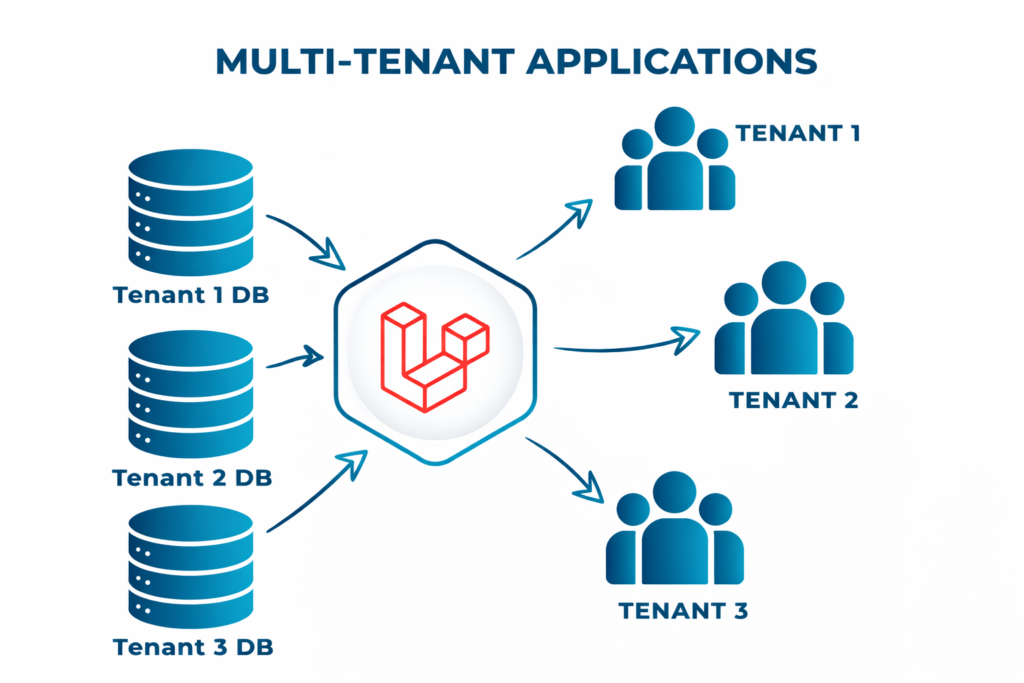
Multi-Tenant vs. Single-Tenant Architecture in Laravel
When building a SaaS platform with Laravel, the choice between multi-tenant and single-tenant architecture depends on your business needs, scalability goals, and budget.
Comparison Table
| Aspect | Multi-Tenant Laravel | Single-Tenant Laravel |
| Flexibility | Shared features, limited customization | Full control, extensive customization |
| Resource Allocation | Shared infrastructure, lower costs | Dedicated resources, higher costs |
| Scalability | Easier to scale with new tenants | Scaling requires per-tenant adjustments |
| Performance Isolation | Requires active monitoring to prevent cross-tenant impact | Isolated by design, predictable performance |
| Data Isolation | Needs robust Laravel mechanisms (e.g., scopes) | Isolated by default |
| Maintenance | Updates rolled out to all tenants at once | Per-tenant updates, higher effort |
Hybrid Approach
For some SaaS applications, a hybrid approach might be the best solution. For example, you could use a single database for shared data (like user accounts and subscriptions) and separate databases for tenant-specific data. This gives you the benefits of both approaches while mitigating some of their drawbacks.
Must-Have Laravel Packages for SaaS Development
One of Laravel’s greatest strengths is its rich ecosystem of packages that can significantly accelerate your SaaS development process. Here are the must-have packages for building a Laravel SaaS application:
Laravel Cashier: Subscription Billing Made Simple
Laravel Cashier simplifies the complex world of subscription billing. It handles almost all of the boilerplate subscription billing code you would otherwise need to write, including managing subscriptions, applying discounts, handling subscription changes, and generating invoices. This package integrates seamlessly with popular payment processors like Stripe and Paddle.
Laravel Spark: SaaS Scaffolding
Laravel Spark provides a starting point for common SaaS features like team billing, subscription management, and more. While it’s not as actively maintained as it once was, it still provides valuable patterns for SaaS development that can save you significant time and effort.
Laravel Sanctum/Passport: API Authentication
For SaaS applications that provide APIs, proper authentication is crucial. Laravel offers two solutions:
- Laravel Sanctum: A simple, lightweight package for API authentication, ideal for applications that need to authenticate single-page applications or mobile apps.
- Laravel Passport: A complete solution for implementing OAuth2, suitable for more complex API requirements where third-party developers might need to access your API.
Laravel Horizon: Queue Management
SaaS applications often need to process time-consuming tasks in the background, such as sending emails or generating reports. Laravel Horizon provides a beautiful dashboard and configuration system for managing these background tasks, ensuring they run reliably and efficiently.
Laravel Nova: Administration Panel
Laravel Nova offers a beautifully designed administration panel for Laravel applications. It provides an elegant interface for managing your application’s data, users, and more. Think of it as the control room for your SaaS application, giving you a comprehensive view of what’s happening across your platform.
Laravel Telescope: Application Debugging
Laravel Telescope is like a high-tech microscope for your application, providing insight into what’s happening under the hood. It helps you understand requests coming into your application, track exceptions, monitor database queries, and much more. This visibility is invaluable for troubleshooting issues and optimizing performance.
Other Valuable Packages
- Spatie’s Laravel Permission: A comprehensive system for managing user roles and permissions
- Laravel Excel: Tools for importing and exporting Excel and CSV files
- Laravel Activitylog: A system for logging user activities within your application
- Laravel Backup: Tools for backing up your application files and databases
- Laravel Webhooks: Simplifies the process of handling incoming and outgoing webhooks
Tenant Isolation Models in Laravel
| Model | Description | Best For |
| Silo Isolation | Fully isolated tenants (e.g., separate databases) | High-security industries |
| Pool Isolation | Shared resources, logical data separation | Cost-efficient, similar workloads |
| Bridge Model | Limited cross-tenant collaboration | Research platforms, shared ecosystems |
| Tier-Based | Group tenants by usage/performance needs | Uneven usage patterns |
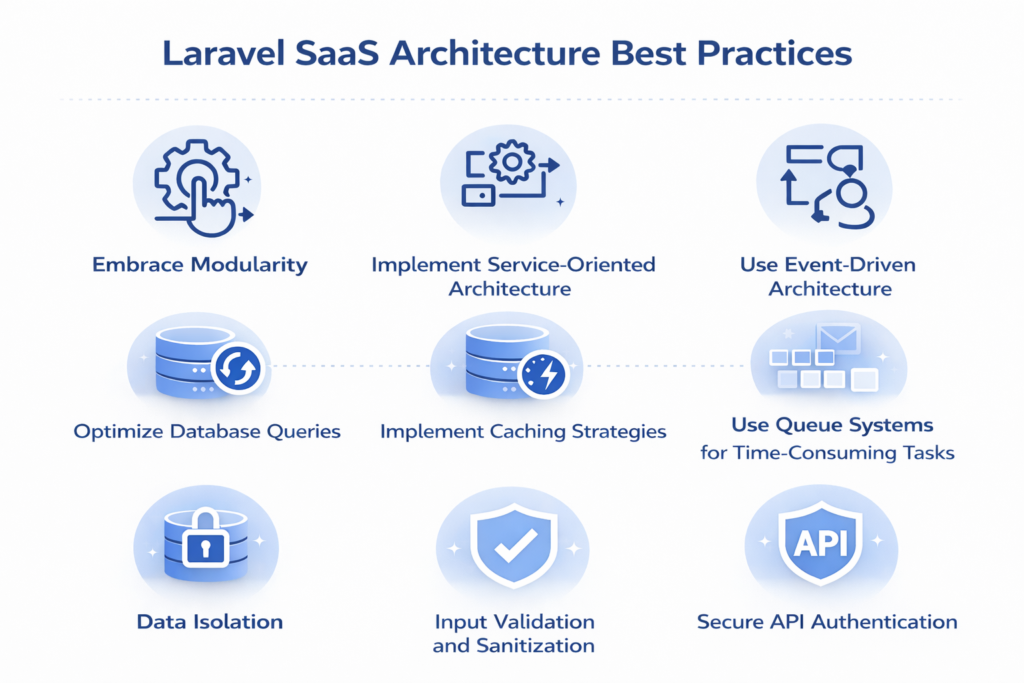
Laravel SaaS Architecture Best Practices
Building a successful SaaS application requires more than just writing code – it requires thoughtful architecture. Here are some best practices to follow when building your Laravel SaaS:
Embrace Modularity
Organize your application into distinct modules or domains, each with its own specific responsibilities. This makes your codebase more maintainable and easier to understand. Think of it like organizing a large company into departments – each department has its own responsibilities but works together toward the company’s goals.
Implement Service-Oriented Architecture
Create service classes to encapsulate business logic, keeping your application focused on its core responsibilities. This makes your code more testable and reusable. Think of services as specialized departments within your application – the billing service handles all payment-related logic, the notification service manages communications, and so on.
Use Event-Driven Architecture
Laravel’s event system allows you to decouple various parts of your application. When a specific action occurs, you can trigger an event that can be handled by multiple listeners. This is particularly useful in SaaS applications for things like sending notifications, updating analytics, or triggering webhooks. For example, when a user upgrades their subscription, you could trigger an event that updates their account, sends a confirmation email, and notifies your billing system.
Optimize Database Queries
In a multi-tenant application, efficient database queries are crucial. Slow queries can make your application feel sluggish and impact user experience. Laravel provides tools to optimize how your application interacts with the database, ensuring that data is retrieved efficiently.
Implement Caching Strategies
Caching can significantly improve the performance of your SaaS application. Think of caching like keeping frequently used items on your desk rather than having to walk to the filing cabinet every time you need them. Laravel’s cache system allows you to store frequently accessed data in memory, reducing the need to repeatedly query the database.
Use Queue Systems for Time-Consuming Tasks
For tasks that take a significant amount of time to process, like sending emails or generating reports, use Laravel’s queue system to process them in the background. This improves the perceived performance of your application – users don’t have to wait for these tasks to complete before they can continue using your application.
Security Considerations for Multi-Tenant Applications
Security is paramount in SaaS applications, where a single vulnerability could compromise multiple customers’ data. Here are the essential security considerations for your Laravel multi-tenant application:
Data Isolation
Ensure that tenants can only access their own data. This is the most critical security aspect of a multi-tenant application. Laravel provides tools to automatically filter data access based on the current user, preventing accidental data leaks between tenants.
Input Validation and Sanitization
Never trust user input. Always validate and clean any data submitted by users to prevent security issues. Laravel’s validation system makes it easy to define rules for what constitutes acceptable data, preventing malicious input from causing problems.
Secure API Authentication
For API endpoints, use secure authentication methods to ensure that only authorized users can access data. Laravel provides tools for implementing secure token-based authentication, ensuring that API requests are properly authenticated.
Encrypted Data Storage
For sensitive data, consider encrypting it before storing it in the database. Laravel provides built-in encryption tools for this purpose. Even if someone gains unauthorized access to your database, encrypted data will be meaningless without the encryption keys.
Regular Security Audits
Regularly audit your application for security vulnerabilities. Use tools to monitor unusual activity, and consider third-party security audits for a comprehensive assessment. Security is not a one-time consideration but an ongoing process.
Scaling Strategies for Your Laravel SaaS
As your SaaS application grows, you’ll need to implement scaling strategies to handle increased traffic and data. Here are proven strategies for scaling your Laravel SaaS:
Database Optimization
Your database is often the first bottleneck as your application scales. Consider these optimization techniques:
- Indexing: Ensure your database tables are properly indexed for common queries.
- Read Replicas: Offload read-heavy queries to replica databases.
- Database Partitioning: For very large tables, consider partitioning to improve query performance.
- Connection Pooling: Use tools to manage database connections efficiently.
Caching Strategies
Implement comprehensive caching strategies to reduce database load:
- Application Caching: Cache frequently accessed data using Laravel’s cache system.
- HTTP Caching: Use HTTP caching headers for responses that don’t change often.
- CDN: Use a Content Delivery Network to cache static assets and reduce server load.
Horizontal Scaling
When your application outgrows a single server, implement horizontal scaling:
- Load Balancing: Distribute traffic across multiple application servers.
- Session Management: Use a centralized session store when scaling horizontally.
- File Storage: Move file storage to a cloud service for easier scaling.
Queue System Optimization
As your application processes more background jobs, optimize your queue system:
- Queue Prioritization: Prioritize critical jobs over less important ones.
- Queue Workers: Scale the number of queue workers based on workload.
- Failed Job Handling: Implement robust failed job handling and retry mechanisms.
Microservices Architecture
For very large applications, consider breaking your monolithic application into microservices:
- Service Identification: Identify logical boundaries in your application that can be separated into services.
- API Gateway: Implement an API gateway to manage requests to your microservices.
- Service Communication: Use message queues or REST APIs for service-to-service communication.
Performance Monitoring
Implement comprehensive performance monitoring to identify bottlenecks:
- APM Tools: Use Application Performance Monitoring tools to track your application’s health.
- Custom Metrics: Track custom metrics specific to your application’s performance.
- Regular Profiling: Regularly analyze your application to identify slow queries or code.
Development Timeline and Cost Breakdown
Understanding the timeline and cost involved in building a Laravel SaaS application is crucial for planning and budgeting. Here’s a realistic breakdown based on industry standards:
Development Timeline: 16-24 Weeks
The development timeline for a Laravel SaaS application typically ranges from 16 to 24 weeks, depending on the complexity and feature set:
| Aspect | Discovery & Planning | Core Development | Advanced Features | Testing & Deployment |
| Duration | 2–3 weeks | 8–12 weeks | 4–6 weeks | 2–3 weeks |
| Key Tasks | Requirements gathering Technical architecture design UI/UX design Project planning | Authentication system Multi-tenancy implementation Core feature development API development | Subscription billing integrationAdmin panel Analytics & reporting Email notifications | Quality assurance testing Security auditing Performance optimization Deployment & launch |
Cost Breakdown: $60K-$150K
The cost of developing a Laravel SaaS application typically ranges from $60,000 to $150,000, depending on various factors:
| Project Type | Cost Range | Key Features |
| Basic SaaS Application | $60K – $80K | – Simple multi-tenancy – Basic subscription billing – Standard features – Minimal customization |
| Mid-Range SaaS Application | $80K – $110K | – Advanced multi-tenancy – Complex subscription models – Custom features- Admin panel – API integration |
| Enterprise SaaS Application | $110K – $150K+ | – Complex multi-tenancy with customization – Advanced analytics and reporting – Extensive API ecosystem – Third-party integrations – Advanced security features |
Factors Affecting Cost:
- Complexity of Features: More complex features require more development time.
- UI/UX Design: Custom design work adds to the cost.
- Third-Party Integrations: Each integration requires additional development and testing.
- Security Requirements: Advanced security features may require specialized expertise.
- Performance Requirements: High-performance applications may need more optimization work.
Case Study: Successful Laravel SaaS Implementation
To illustrate the power of Laravel for SaaS development, let’s look at a real-world example of a successful Laravel SaaS application.
Client: ConnectSphere CRM
ConnectSphere, a startup founded by former sales executives, had a vision for a customer relationship management (CRM) system specifically designed for small to medium-sized businesses. They needed a solution that was both powerful and affordable, with the flexibility to adapt to different business processes.
The Challenge
The primary challenges were:
- Creating a multi-tenant architecture that could handle thousands of customers
- Implementing a flexible subscription model with multiple tiers
- Developing an intuitive user interface that non-technical users could navigate
- Integrating with popular email marketing and accounting platforms
- Ensuring robust security for sensitive customer data
The Solution
The development team created a comprehensive Laravel-based SaaS solution that addressed all of ConnectSphere’s requirements:
Multi-Tenancy Architecture
They implemented a hybrid multi-tenancy approach, using a single database for shared data and separate databases for tenant-specific data. This provided optimal performance while maintaining data isolation.
Subscription Billing
Using Laravel’s billing tools, they implemented a flexible subscription system with multiple tiers, usage-based billing, and promotional code support. The system handled everything from subscription creation to automated invoicing.
Intuitive User Interface
The design team created a clean, intuitive interface that prioritized user experience. They implemented progressive disclosure techniques to present complex features in an approachable way.
Third-Party Integrations
They developed a robust API and integrated with popular services like Mailchimp, QuickBooks, and Google Calendar. Webhooks ensured real-time synchronization between platforms.
Security Implementation
They implemented comprehensive security measures, including data encryption, role-based access control, and regular security audits. All sensitive data was encrypted both in transit and at rest.
The Results
The ConnectSphere CRM was launched within 20 weeks, coming in under budget at $95,000. Within six months of launch:
- ConnectSphere acquired 1,200 paying customers
- The system processed over 5 million API calls monthly with 99.9% uptime
- Customer satisfaction scores averaged 4.7 out of 5
- The company secured Series A funding based on the platform’s success
This case study demonstrates how Laravel’s robust ecosystem and flexible architecture can be leveraged to create successful, scalable SaaS applications.
Conclusion: Building Your SaaS Success with Laravel
Laravel has established itself as the premier framework for SaaS development, offering a perfect blend of robustness, flexibility, and developer productivity. Its rich ecosystem of packages, elegant syntax, and powerful features make it the ideal choice for building multi-tenant applications that can scale with your business.
From implementing multi-tenancy architecture to integrating subscription billing, from ensuring security to optimizing performance, Laravel provides the tools and patterns you need to build a successful SaaS application. The framework’s active community and extensive documentation mean you’re never alone in your development journey.
As we’ve seen in the ConnectSphere case study, a well-architected Laravel SaaS can achieve remarkable success in a short period. With a development timeline of 16-24 weeks and a cost range of $60K-$150K, building a Laravel SaaS is an achievable goal for startups and established businesses alike.
Are you ready to turn your SaaS idea into reality? Whether you’re just starting to explore the concept or have detailed requirements ready, our team, Binary Fusion, of experienced Laravel developers, can guide you through every step of the process, from initial concept to successful launch and beyond.

![Flutter UI Design: Create Beautiful Mobile App Interfaces [2026]](https://blog.binary-fusion.com/wp-content/uploads/2026/02/featured-flutter-ui-design-guide-1.png)
![Laravel + React: The Complete Guide for Business Owners and Beginners [2026]](https://blog.binary-fusion.com/wp-content/uploads/2026/02/Gemini_Generated_Image_665qn8665qn8665q.png)