Imagine you want to build a house. You need two things:
- A strong foundation with plumbing, electricity, and structure that works behind the walls
- Beautiful interiors with furniture, paint, and design that make it enjoyable to live in
Building a modern website works the same way.
If you’re exploring Laravel React development, this guide is for you. Combining Laravel with React creates full-stack websites that are fast, secure, and visually appealing. Whether you’re a beginner or a business owner, learning Laravel React best practices will help you build modern, scalable applications.
Laravel is the foundation the powerful system working behind the scenes. React is the beautiful interior what your visitors actually see and interact with. When you combine them, you get something remarkable: a website that’s both rock-solid and a joy to use.
This guide explains Laravel React development in plain English. No confusing code. No technical jargon. Just clear answers about what this technology combination means for your business, your website, and your customers.
Whether you’re a business owner planning a new website, a manager overseeing a project, or simply curious about how modern websites work, you’re in the right place.
Let’s start with the basics.
What Exactly Are We Talking About?
Let’s define our terms right from the start.
What is Laravel?
Laravel is a “backend framework.” That sounds technical, but here’s what it really means:
Think of Laravel as the engine room of a ship. Passengers never see it, but without it, the ship isn’t going anywhere. It controls everything essential: power, navigation, communication, and safety.
In website terms, Laravel handles:
- User accounts and logins (who can access what)
- Database management (storing all your content and customer information)
- Business rules (what should happen when someone places an order)
- Security (keeping hackers out)
- Performance (making sure your site doesn’t crash when lots of people visit)
Laravel was created in 2011 and has become the world’s most popular PHP framework. “PHP” is just a language that powers millions of websites, including Facebook and Wikipedia.
What is React?
React is a “frontend library.” Here’s what that means in simple terms:
Think of React as the interior design team for that ship. They design the passenger decks, the restaurants, the lounges—everything people actually see and touch. Their goal is to make the experience comfortable, intuitive, and even enjoyable.
In website terms, React handles:
- User interface (buttons, forms, menus, layouts)
- Interactivity (what happens when you click something)
- Speed (updating the screen instantly without waiting)
- Mobile-friendliness (working perfectly on phones and tablets)
React was created by Facebook in 2013 and now powers Instagram, Netflix, Airbnb, and thousands of other sites you use every day.
So What is Laravel React Development?
Laravel React development simply means building a website that uses Laravel for the behind-the-scenes work and React for the customer-facing experience.
It’s like building a restaurant with:
- A world-class kitchen (Laravel) where food is prepared safely and efficiently
- A beautiful dining room (React) where customers enjoy their meal
The kitchen and dining room need each other. A great kitchen with an ugly dining room fails. A beautiful dining room with a terrible kitchen fails. Together, they create something special.
Why This Combination Is Taking Over the Web
You might be wondering: why are so many companies choosing Laravel with React? Let me explain from three different perspectives.
From a Business Owner’s Perspective
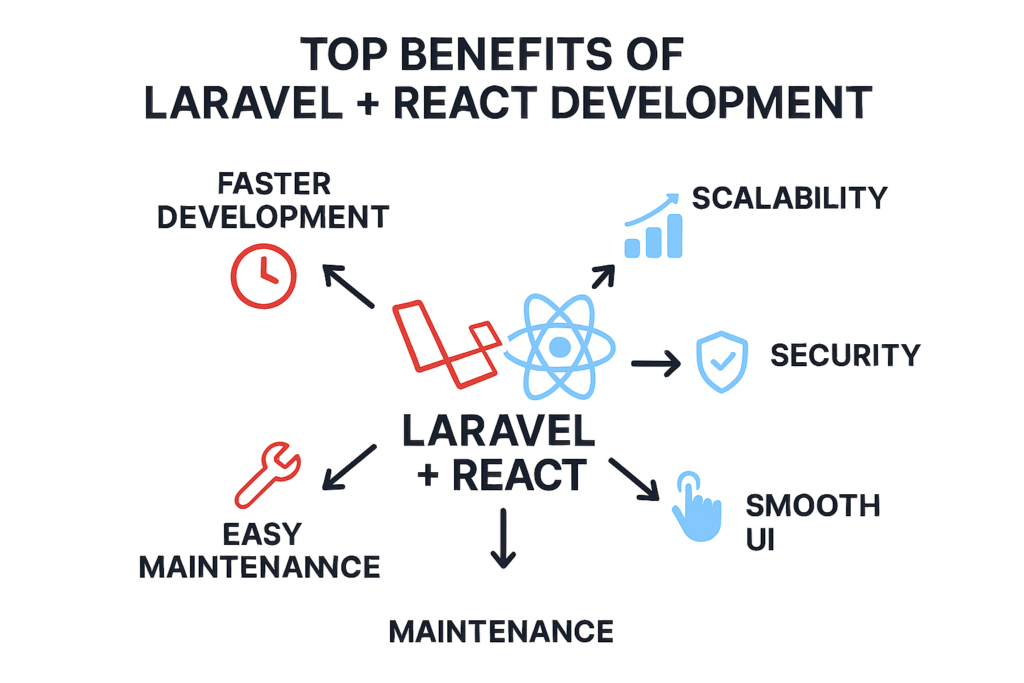
1. Faster Development = Lower Costs
Because Laravel provides so many pre-built components, developers don’t have to build everything from scratch. A project that might take six months with other technologies can often be completed in three to four months with Laravel React. Time is money.
2. Scalability = Room to Grow
Maybe you start with a simple website. But what if your business explodes and you suddenly have ten thousand visitors a day? Laravel is built to handle growth. It scales up effortlessly as your business succeeds.
3. Modern Feel = Customer Trust
Websites built with React feel smooth and responsive. They work like mobile apps. When customers visit a site that feels modern and professional, they trust that business more. First impressions matter.
4. One Codebase = Easier Maintenance
With older approaches, companies often ended up with separate systems for their website, their mobile app, and their internal tools. With Laravel React, one powerful backend can power everything. That means lower maintenance costs for years to come.
From a Developer’s Perspective
1. Better Tools
Laravel comes with built-in solutions for common tasks like authentication, caching, and email. React provides amazing tools for building interfaces. Developers get to focus on building your unique features instead of reinventing wheels.
2. Huge Community
When developers get stuck, they need answers. Laravel and React have enormous communities. There are millions of tutorials, forums, and experts available. Problems get solved faster.
3. High Demand
Developers who know full-stack Laravel React are in high demand. That means if you hire them, you’re getting people with valuable, current skills. If you build this knowledge yourself, you’re investing in a valuable career skill.
From a User’s Perspective
1. Speed
Nobody likes waiting for websites to load. React updates screens instantly. When a user clicks something, something happens immediately. No waiting for pages to reload.
2. Reliability
Laravel’s robust backend means fewer errors and crashes. Forms don’t randomly fail. Checkouts actually work. Users appreciate reliability more than any fancy feature.
3. Consistency
Because React uses reusable components, the website feels consistent. Buttons work the same way everywhere. Forms behave predictably. This makes the site easier and more pleasant to use.
The Big Decision: Two Ways to Connect Laravel and React
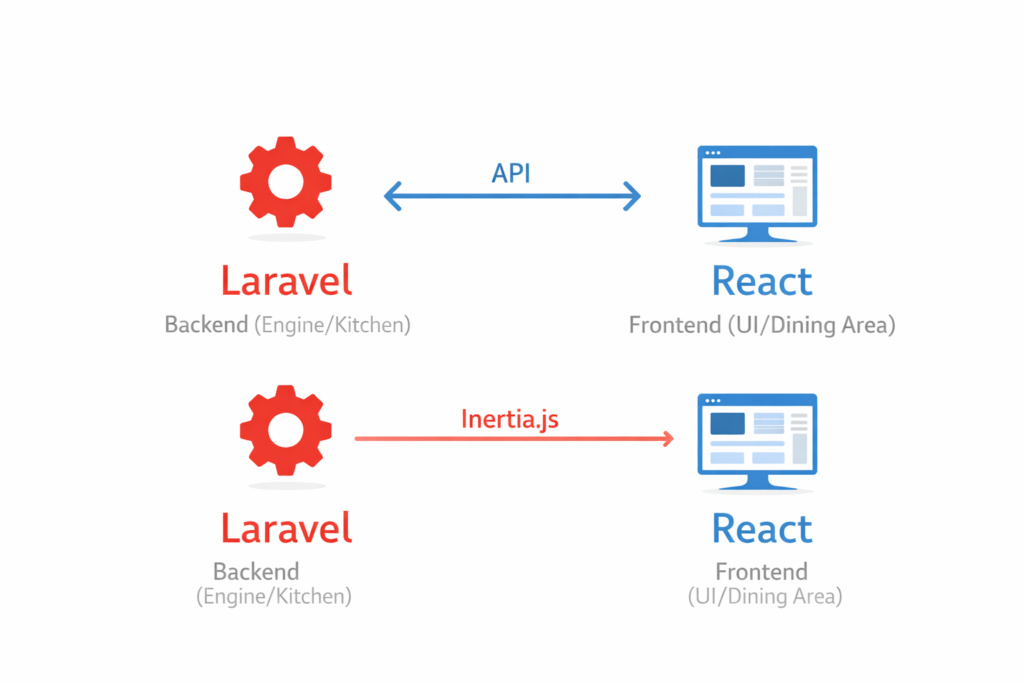
Now we come to the most important decision in any Laravel React tutorial: how exactly do we connect these two pieces?
There are two main approaches. Think of them as two different restaurant layouts.
Approach 1: The Waiter System (API-Based Architecture)
Definition: API stands for Application Programming Interface. In simple terms, it’s a waiter who carries information between the kitchen and the dining room.
How It Works:
- Laravel (the kitchen) prepares data (the food)
- An API (the waiter) carries that data to the front
- React (the dining room) presents it beautifully to the customer
The kitchen and dining room are separate. Waiters constantly run back and forth with orders and food.
Visual Example:
Imagine a restaurant where the kitchen is in a separate building. Waiters take orders, run to the kitchen, wait for food, and run back. It works, but there’s a lot of running around.
Pros of This Approach:
- Flexibility: That same waiter can serve multiple dining rooms. Your Laravel kitchen can feed a website, a mobile app, and a partner’s system all at once.
- Independent Teams: The kitchen staff (backend developers) and waitstaff (frontend developers) can work separately without stepping on each other’s toes.
- Future-Proof: If you later decide to build an iPhone app, your existing Laravel kitchen can serve it immediately.
Cons of This Approach:
- More Complexity: You’re managing two separate systems instead of one.
- Potential for Slowness: All that running back and forth can sometimes create delays.
- More Expensive Initially: More moving parts mean more development time upfront.
Approach 2: The Open Kitchen Concept
Definition: Inertia.js is a modern tool that connects Laravel and React directly, eliminating the need for a separate API waiter.
How It Works:
- The kitchen is right in the dining room (an open kitchen concept)
- Chefs (Laravel) can hand dishes (data) directly to servers (React)
- Everything feels like one seamless experience
Visual Example:
Think of a trendy restaurant with an open kitchen. You can see the chefs cooking. The interaction between the kitchen and the dining room is immediate and fluid.
Pros of This Approach:
- Faster Development: No need to build a complex API layer. Projects launch 30-40% faster.
- Better for Google (SEO): Because everything is integrated, search engines can easily read and rank your site.
- Simpler Deployment: You’re launching one system, not two. Fewer things can go wrong.
- Lower Initial Cost: Less complexity means lower development costs.
Cons of This Approach:
- Less Flexible: This kitchen serves only this dining room. You can’t easily reuse it for a mobile app.
- More Tied Together: Changes in the kitchen might directly affect the dining room.
- Team Dependency: Backend and frontend developers need to work more closely together.
Your Decision Framework (Which Path to Choose)
Still unsure which approach fits your project? Here’s a simple decision framework used by Laravel React best practices experts.
Choose the API Approach (Waiter System) If:
You’re building a mobile app now or in the future
If you know you’ll eventually want iPhone and Android apps, the API approach lets you reuse your Laravel backend for all of them.
You plan to offer services to other companies
Some businesses sell access to their data or services. If that’s in your plans, you’ll need an API.
You have separate frontend and backend teams
Larger organizations often have specialized teams. The API approach lets them work independently.
You’re building something massive, like a marketplace
Complex platforms with multiple types of users and integrations benefit from the flexibility of APIs.
You need to integrate with many third-party systems
If your site needs to talk to many other services, an API-centric design makes sense.
Choose the Inertia.js Approach (Open Kitchen) If:
You’re building a standard business website
Most company websites, blogs, and online stores fall into this category.
Google rankings are important to your business
Inertia sites are naturally easier for search engines to understand and rank.
You want to launch quickly and keep costs down
If speed to market and budget are primary concerns, Inertia is usually the better choice.
Your team is smaller and works closely together
Startups and small businesses often benefit from the simpler, more integrated approach.
You’re building an internal business tool
Dashboards, management systems, and internal portals are perfect for Inertia.js.
What Building a Laravel React Project Actually Looks Like
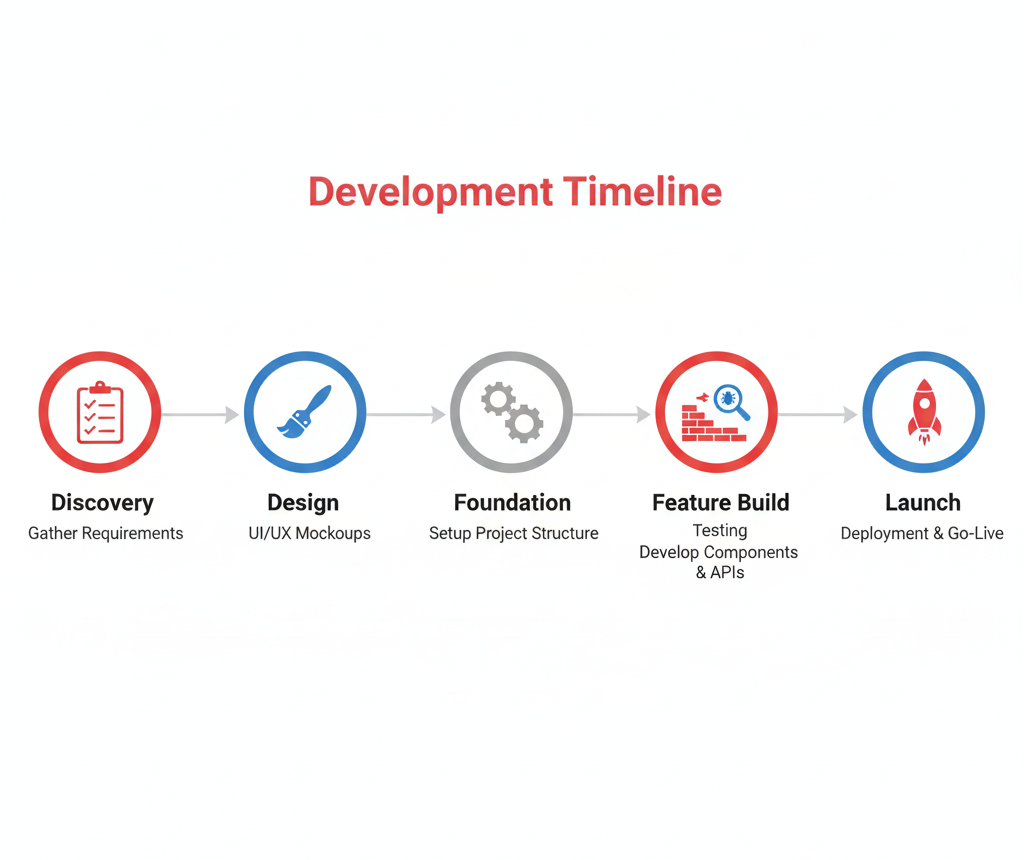
Let’s walk through what happens when you build a website with full-stack Laravel React. This timeline gives you a realistic picture of the process.
Phase 1: Discovery and Planning (1-3 Weeks)
What Happens:
- We discuss your business goals and target audience
- We map out exactly what your website needs to do
- We decide which approach (API or Inertia) fits best
- We create a detailed project plan and timeline
Your Involvement: High. Your input is essential during this phase.
Deliverable: A clear project roadmap and fixed-price proposal.
Phase 2: Design and Prototyping (2-4 Weeks)
What Happens:
- Designers create wireframes (simple layouts showing where everything goes)
- We develop visual designs that match your brand
- We build clickable prototypes so you can see how the site will feel
- You provide feedback, and we refine
Your Involvement: Medium. You’ll review designs and provide feedback.
Deliverable: Approved designs and interactive prototype.
Phase 3: Development – Foundation (3-6 Weeks)
What Happens:
- Developers set up the Laravel backend (your kitchen)
- The database structure is created to hold your content
- User authentication and security systems are built
- Basic React components are created (buttons, forms, navigation)
Your Involvement: Low. This is behind-the-scenes work.
Deliverable: A working development site (not yet public).
Phase 4: Development – Building Features (4-8 Weeks)
What Happens:
- All your specific features are built
- Pages are populated with real content
- The site is tested continuously for bugs
- Performance is optimized for speed
Your Involvement: Medium. You’ll review features as they’re completed.
Deliverable: A fully functional website on a private staging server.
Phase 5: Testing and Refinement (2-3 Weeks)
What Happens:
- Thorough testing on all devices (phones, tablets, computers)
- Testing across all browsers (Chrome, Safari, Firefox, Edge)
- Security testing to ensure everything is locked down
- Performance testing to ensure fast loading
- You test the site thoroughly and provide final feedback
Your Involvement: High. This is your chance to test everything.
Deliverable: A polished, bug-free site ready for launch.
Phase 6: Launch and Beyond (1 Week + Ongoing)
What Happens:
- The site is deployed to your public server
- Domain names and hosting are configured
- Search engines are notified of your new site
- We monitor closely for any issues
- Ongoing maintenance and support begin
Your Involvement: Low. You celebrate your new website!
Deliverable: Your live website and ongoing support.
Total Timeline: 4-6 Months for Most Projects
Simple sites: 3-4 months
Medium complexity: 4-6 months
Complex platforms: 6-12 months
Real Costs and Considerations
Let’s talk honestly about what Laravel React development costs. Every project is different, but here are realistic ranges.
Development Costs
| Project Type | Typical Range | What You Get |
| Simple Website | $15,000 – $30,000 | Company site with blog, contact forms, basic interactivity |
| E-commerce Store | $30,000 – $60,000 | Product catalog, shopping cart, payment processing, customer accounts |
| Custom Web Application | $50,000 – $150,000+ | Custom business software, dashboards, complex features |
Ongoing Costs (Monthly)
| Item | Typical Cost |
| Hosting | $50 – $500 (depending on traffic) |
| SSL Certificate | $0 – $200/year (often free) |
| Domain Name | $10 – $50/year |
| Maintenance/Support | $500 – $2,000 (optional but recommended) |
| Third-party Services | Varies (payment processing, email service, etc.) |
Factors That Affect Cost
- Complexity: More features mean more development time
- Design Requirements: Custom designs cost more than templates
- Integrations: Connecting to other systems adds complexity
- Timeline: Faster delivery may require more resources
- Team Location: Rates vary by region and expertise
Common Questions Answered
1. “Is my website going to be slow?”
No. In fact, Laravel React development typically produces faster websites than traditional approaches. React updates only what needs to change, and Laravel is highly optimized for speed.
2. “What if I need to change something later?”
That’s easy. Both Laravel and React are designed for change. Adding new features or updating existing ones is straightforward. That’s one reason companies choose this combination.
3. “Can I update content myself?”
Yes. Most Laravel React sites include a content management system (CMS) that lets you update text, images, and other content without touching code. You don’t need to call your developer for every small change.
4. “What about mobile phones?”
Perfect. React is specifically designed to work beautifully on mobile devices. Your site will look and work great on iPhones, Androids, tablets, and everything else.
5. “Is my data safe?”
Yes. Laravel has exceptional security features built in. It protects against SQL injection, cross-site scripting, and other common attack vectors. Your customer data is in good hands.
6. “What if my business grows a lot?”
You’re covered. Laravel scales beautifully. It powers some of the largest websites in the world. As your traffic grows, your site can grow with it.
7. “Do I need to understand code to manage this?”
No. While development requires technical expertise, managing a finished site does not. Your team can update content and use the site without knowing anything about what’s underneath.
8. “How is this different from WordPress?”
WordPress is excellent for simple blogs and brochure sites. Laravel with React is for when you need something more powerful: custom functionality, complex business rules, unique user experiences, or integration with other systems.
Best Practices Checklist (What Quality Looks Like)
When evaluating a Laravel React project or development team, here’s what quality looks like. Use this as a checklist.
Planning Phase
- Clear project goals are defined before code is written
- Target audience identified and considered
- The decision between API and Inertia was made deliberately
- Realistic timeline established
Design Phase
- Mobile-first approach (designs start with phones, then expand)
- Consistent visual language throughout
- User testing on prototypes before development
- Accessibility considerations (usable by people with disabilities)
Development Phase
- Version control (all code is tracked and managed)
- Regular backups
- Security best practices followed
- Code is documented (explained for future maintenance)
- Performance optimization is built in from the start
Testing Phase
- Tested on multiple devices and browsers
- Load testing (simulates traffic to ensure stability)
- Security testing
- User acceptance testing (you verify everything works)
Launch Phase
- Smooth domain and hosting setup
- Analytics installed (so you can see your traffic)
- SEO basics implemented
- Backup system verified
- Maintenance plan established
Conclusion – The Right Choice for Modern Websites
Building a website is a significant investment. You deserve technology that will serve you well for years to come.
Laravel React development offers:
- A rock-solid foundation that grows with your business
- Beautiful user experiences that customers love
- Efficient development that respects your budget
- Future flexibility for mobile apps and new features
- Strong security that protects your data
Think of it as building a restaurant with a world-class kitchen and a beautiful dining room. Your customers enjoy the experience. Your staff works efficiently. Your business thrives.
The alternative patchwork solutions, outdated technology, or platforms that can’t grow with you might seem cheaper initially, but almost always cost more in the long run.
Have questions? [Contact our team] anytime. We’re happy to help.

![Flutter UI Design: Create Beautiful Mobile App Interfaces [2026]](https://blog.binary-fusion.com/wp-content/uploads/2026/02/featured-flutter-ui-design-guide-1.png)